- contact@verticalserve.com
- Continuous compliance, proven every hour

Integrations
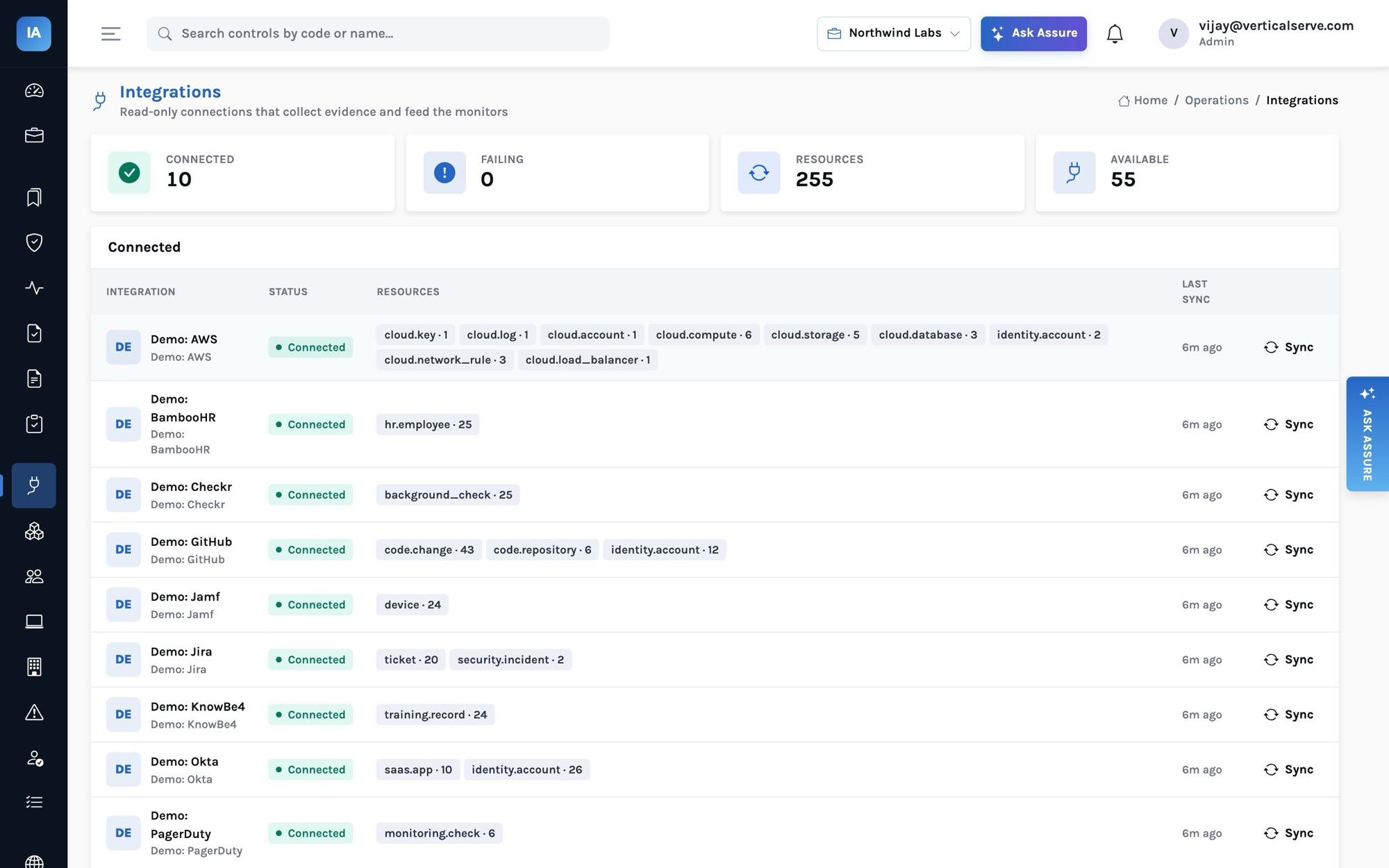
45 read-only connectors, one inventory
Each connector reads its system with least-privilege, read-only credentials and maps what it finds into the same normalized resources, so every monitor works with whichever tools you use.
Connect
Read-only, sealed, testable at any time
Each connector’s setup guide says exactly which credential to create and which scopes it needs: an AWS role with SecurityAudit and ViewOnlyAccess assumed with an external ID, a GitHub fine-grained token with read access, an Okta read-only administrator’s token, a service account for Google Workspace.
- Secrets are sealed in your secret store, or encrypted with AES-GCM bound to the row; a value written
ref:aws-sm://…points at a secret you already keep - The API never returns a credential, and a failed sync never marks anything deleted
- Every outbound call refuses private, loopback and cloud-metadata addresses unless a self-hosted deployment allows them
- Ticketing connectors (Jira, Linear, Asana) can also open an issue as a ticket
Normalize
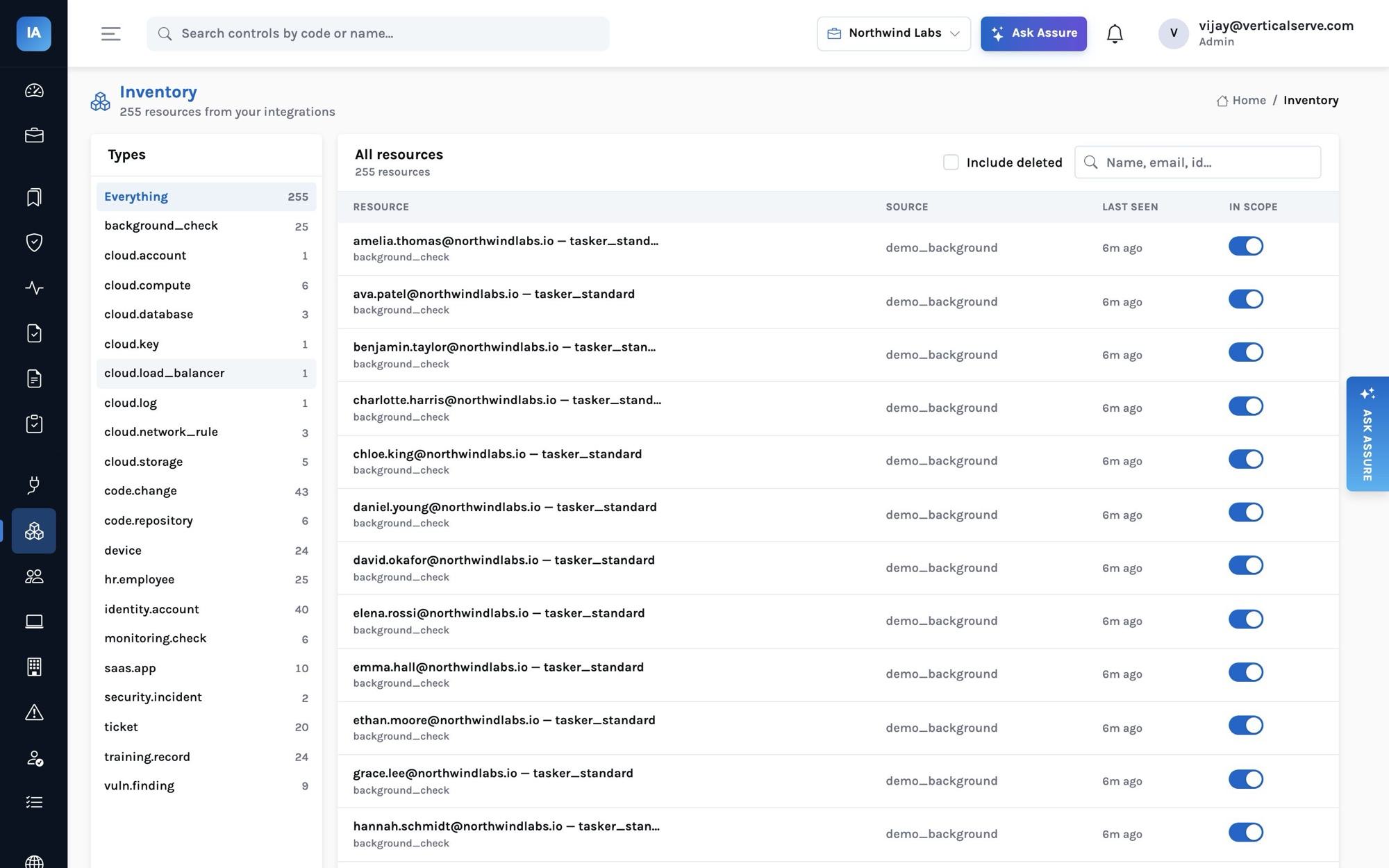
Twenty resource types, whatever the vendor
Accounts from Okta, GitHub, AWS and Slack are all identity.account with the same mfa_enabled, admin and last_login attributes; laptops from Jamf, Intune, CrowdStrike or the agent are all device. Swap one tool for another and nothing downstream changes.
The catalog
Every connector in the product
Grouped as the product groups them. The resource types each one fills are listed under it.
Cloud providers
Amazon Web Services
IAM (root MFA, password policy, users, access keys), S3, RDS, EC2, security groups, KMS, CloudTrail, GuardDuty, Config, load balancers and Inspector findings.
cloud.accountidentity.accountcloud.storagecloud.database
Cloudflare
Zones as public endpoints (HTTPS only, minimum TLS, WAF) and account members (2FA, admin).
cloud.load_balanceridentity.account
DigitalOcean
Droplets, managed databases (backups, public access) and cloud firewalls.
cloud.accountcloud.computecloud.databasecloud.network_rule
Google Cloud
Projects, IAM members and service-account keys, Cloud Storage, Cloud SQL, firewall rules, Compute instances and audit logging.
cloud.accountidentity.accountcloud.storagecloud.database
Heroku
Team members with two-factor status and role; apps and their Heroku Postgres databases.
identity.accountcloud.computecloud.database
Microsoft Azure
Subscriptions, storage accounts, SQL servers and databases, NSGs, Key Vault keys, Defender for Cloud, activity-log diagnostics and VMs.
cloud.accountcloud.storagecloud.databasecloud.network_rule
Identity & SSO
Google Workspace
Users with suspension, last sign-in, 2-Step Verification and admin status; OAuth apps people authorized (vendor discovery).
identity.accountsaas.app
JumpCloud
Users with suspension, MFA and admin status; managed systems as devices (FileVault/BitLocker, firewall).
identity.accountdevice
Microsoft Entra ID
Users with account status, last sign-in, MFA registration and administrator roles; enterprise applications.
identity.accountsaas.app
Okta
Users with status, last sign-in, enrolled MFA factors and administrator roles; applications for vendor discovery.
identity.accountsaas.app
OneLogin
Users with status, last login, MFA devices and roles.
identity.account
HR systems
BambooHR
Employees and contractors with status, title, department, manager, hire and termination dates.
hr.employee
Deel
Workers (EOR, direct employees, contractors) with hiring status, start and end dates.
hr.employee
Gusto
Employees (with terminations) and contractors.
hr.employee
HiBob
Employees and contractors with status, start and termination dates, title, department and manager.
hr.employee
Justworks
Employees from the Justworks census export (CSV) — Justworks has no public employee API.
hr.employee
Personio
Employees with status, position, department, supervisor, hire and termination dates.
hr.employee
Rippling
Workers with status, title, department, manager, start and end dates.
hr.employee
Workday
Workers from a Workday custom report (RaaS, JSON) — current and terminated.
hr.employee
Version control
Azure DevOps
Repositories with branch policies (minimum reviewers, build validation) and completed pull requests with approvals.
code.repositorycode.change
Bitbucket
Repositories with branch restrictions (required approvals, no force push), merged pull requests and approvals, workspace members.
code.repositorycode.changeidentity.account
GitHub
Repositories with branch protection, required reviews, secret scanning and Dependabot; merged pull requests and their approvals; members with 2FA; Dependabot alerts.
code.repositorycode.changeidentity.accountvuln.finding
GitLab
Projects with protected branches and approval rules, merged merge requests with approvals, members with 2FA.
code.repositorycode.changeidentity.account
Device management (MDM)
Jamf Pro
Managed Macs: FileVault, OS version, firewall, Gatekeeper/SIP, assigned user and last check-in.
device
Kandji
Apple devices: FileVault, firewall, OS version, assigned user, agent check-in.
device
Microsoft Intune
Windows, macOS, iOS and Android devices: encryption, compliance state, OS version and primary user.
device
Endpoint security
CrowdStrike Falcon
Every host with a Falcon sensor (status, last seen, OS) and high or critical alerts.
devicesecurity.incident
SentinelOne
Agents with active protection, disk encryption and infection state; unresolved threats as incidents.
devicesecurity.incident
Vulnerability & code scanning
Qualys VMDR
Active and re-opened host detections (severity 3–5 by default) with QID, host and first-found date.
vuln.finding
Snyk
Open vulnerabilities and code issues with severity, package and first-seen date, across every project in the organization.
vuln.finding
Tenable Vulnerability Management
Open and reopened vulnerabilities with severity, CVE, asset and first-found date (vulnerability export).
vuln.finding
Wiz
Open vulnerability findings and issues (misconfigurations, toxic combinations) across the cloud estate.
vuln.finding
Ticketing & tasks
Asana
Tasks of a security or change project as tickets; pushes remediation tasks to it.
ticket
Jira
Security, change and incident tickets (by JQL) for change-management and incident populations; pushes remediation issues.
ticketsecurity.incident
Linear
Security / change issues (by label) as tickets; pushes remediation issues to a team.
ticket
Monitoring & on-call
Datadog
Monitors (metric, log, APM, uptime) and synthetic tests, with whether they notify someone.
monitoring.check
Opsgenie
On-call schedules, escalations and P1/P2 incidents.
monitoring.checksecurity.incident
PagerDuty
Services, on-call schedules and escalation policies; high-urgency incidents from the last 180 days; users.
monitoring.checksecurity.incidentidentity.account
Sentry
Projects with issue alert rules (error monitoring and alerting) and members with 2FA.
monitoring.checkidentity.account
Security training
KnowBe4
Training campaign enrollments with status, completion and due dates for every user.
training.record
Background checks
Checkr
Background check reports (status, result, completion date, package) by candidate email.
background_check
Communication
Slack
Members with deactivation, admin/owner and two-factor status (2FA is reported on paid plans).
identity.account
Insight platform
InsightFortify
Scored application, container, IaC, secret and cloud findings from InsightFortify, with its cloud compliance posture.
vuln.findingcloud.account
Custom & import
CSV import
Any resource type from a CSV — systems without an API, or a one-off inventory (laptops, vendors' accounts, legacy apps).
identity.accounthr.employeedevicecode.repository
Push API
Send resources from your own scripts or internal systems with an API key; anything the contract describes.
identity.accounthr.employeedevicecode.repository
Bring your own
CSV import and the push API
For an internal system with no connector, send normalized resources yourself with an API key.
curl -X POST https://app.insightassure.com/api/integrations/<connection id>/resources \
  -H "X-API-Key: $ASSURE_KEY" -H "Content-Type: application/json" \
  -d '{"complete": true, "resources": [
        {"type": "identity.account", "external_id": "u1", "name": "ada@acme.com",
         "attributes": {"email": "ada@acme.com", "system": "billing-admin", "mfa_enabled": false, "admin": true}}]}'
complete: true means this is everything: resources not in the batch are marked deleted.
How it works
A connector’s life: credentials in, resources out, nothing else touched
Questions it answers
What you can find out
Each one is answered on a screen you can open, and most can be typed into Ask Assure as they are.
Which systems are connected, and are they syncing?Integrations: status, last sync and resource counts
Which SaaS apps do people use that are not vendors?Vendors → Discovered SaaS, from the IdP
What did the AWS integration find?The integration’s resources by type
Which accounts belong to nobody in HR?Every account belongs to a known person
Did the scanner report this week?A vulnerability scanner reported in the last 7 days
What exactly does the GitHub token need?The connector’s setup guide
Outcomes
What teams do with it
Least privilege by default
Every credential is read-only and documented before you create it.
Tools change, tests do not
Moving from Jamf to Intune keeps every device test as it was.
Nothing left out
Internal systems join through CSV or the push API.
Where it stops. Every connector follows its vendor’s documented API, and the main ones are tested against recorded responses; a connector’s first sync against your tenant is the real test, which is why pilots start with a handful. Some attributes depend on the vendor’s plan (for example Slack’s two-factor flag).